Put Your CRM to Work: Connect CRM Data with Product Knowledge
Your CRM knows who the customer is – not what to sell them. Genow connects CRM data with product knowledge from SharePoint and your product database.
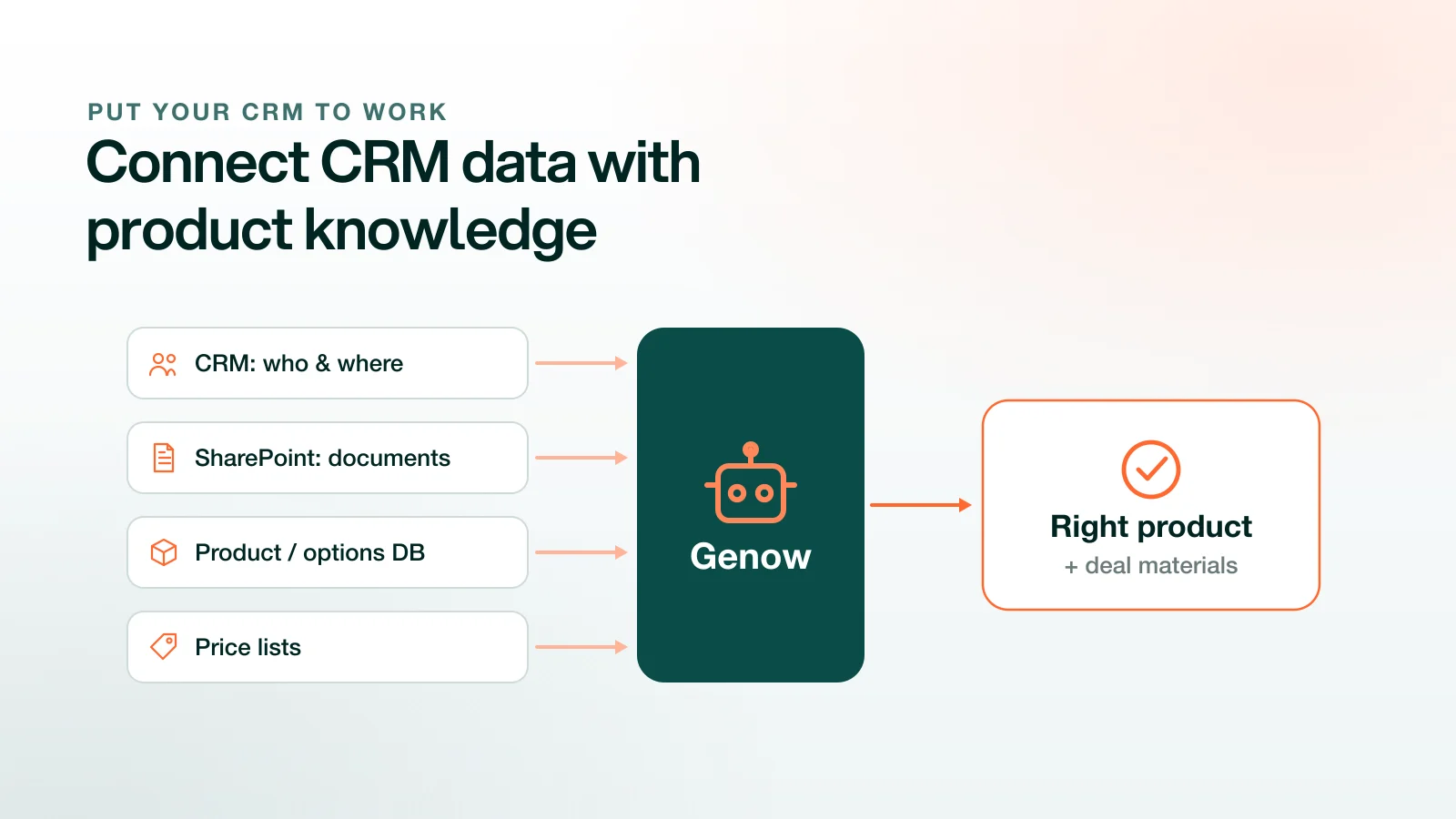
Your CRM – Salesforce or HubSpot – knows the who and where: accounts, contacts, pipeline stage, history. It doesn’t know the what: no product knowledge, no validity rules, no datasheets, no pricing logic. So the CRM records the deal but doesn’t advance it. Genow connects to the CRM and intelligently links its data with operational knowledge from SharePoint, the product/options database, and price lists – in the same deal workspace. “Who is the customer” becomes “which valid product fits their requirement – and here are the materials for it.” That turns the CRM from a log into an active selling tool.
What the CRM knows – and what it doesn’t
The CRM is the system of record for relationships and pipeline: who the account is, which contacts exist, what stage the deal is at, who owns it, what happened so far, the forecast. That’s necessary – but it’s a contact-and-process database, not a product-knowledge system.
It can’t tell a rep which of 30,000 variants fits a spec, checks no validity rules, and holds neither datasheets nor pricing logic. So reps jump out of the CRM: into SharePoint, into emails to the business unit, into legacy portals. The deal context sits in one silo, the product knowledge in the others.
Even a clean CRM doesn’t solve the problem
Data quality makes it worse: B2B CRM data decays by an estimated 25–30% per year, and common studies cite around 91% of CRM data as incomplete, stale, or duplicated. On top of that, CRM upkeep itself often fails (CRM initiatives fail in roughly 50–63% of cases) because reps reject admin work.
But even a perfectly maintained CRM stays a who-and-where database. The bigger gap isn’t the dirty address – it’s that the CRM was never built to answer “what should I sell this customer?”
What “connect” actually means
Genow connects the CRM and links the deal context with operational knowledge: SharePoint (datasheets, sales arguments, presentations, marketing), the customer’s own options/variants database with validity rules, and price lists. In one workspace per deal, the agent reasons across all of it: it pulls account and requirement context from the CRM, matches it to the right valid product – with reasoning – and assembles the right materials.
This exact interplay is proven in live deployments: product knowledge (often on SharePoint), an options database with tens of thousands of valid options and their rules, price lists, and research from public competitive sources – connected into one deal in which the rep reaches the right result by voice.
Overview: what each system contributes
| System | Holds | Answers | Gap without Genow |
|---|---|---|---|
| CRM (Salesforce, HubSpot) | Accounts, contacts, pipeline, history | Who the customer is, where the deal stands | No product knowledge – doesn’t say what to sell |
| SharePoint / documents | Datasheets, sales arguments, presentations | What information exists | Unstructured, not retrievable per deal |
| Product/options database | Variants, options, validity rules | What is buildable and valid | Hard for sales to access, no link to the deal |
| Price lists | Prices, terms | What it costs | Separate from product knowledge |
| Genow (connective layer) | Connects all four | Which valid product fits the requirement – plus materials | – (closes the gap) |
From a log to an active tool – and back into the CRM
Connecting works both ways. Today Genow grounds the deal in CRM context and operational knowledge to produce the match and materials. The loop closes when results flow back: the matched product, the generated materials, and the deal progress update the CRM – without rep admin. This is where the agentic approach pays off: the rep delegates by voice and the agent maintains the record – instead of typing into fields they otherwise avoid.
For the centralized platform strategy
For larger enterprises rolling out AI use cases centrally – comparable to a platform approach like Copilot Studio – Genow is the layer that connects CRM, SharePoint, the product database, and price lists into concrete sales outcomes: governed, explainable, data-sovereign. Not “chat with your data,” but a concrete, business-owned outcome on top of the systems you already run – GDPR-compliant, with the CRM as the leading system.
FAQ
Does Genow replace my CRM?
No. Genow connects to Salesforce or HubSpot and makes the CRM data usable by linking it with product knowledge. The CRM stays the system of record.
Which CRMs can be connected?
Salesforce and HubSpot are the most common; other systems via connectors as part of the integration project.
Where does the product knowledge come from?
From your operational stack: SharePoint (datasheets, arguments, presentations), the product/options database with validity rules, and the price lists.
Does Genow also write back to the CRM?
Today, connecting and integrating systems is the core. Writing data back — matches, materials, deal status — closes the loop and can be activated at the customer’s request. Steered by voice, not as manual admin work.
Where does my data run?
Data-sovereign and GDPR-compliant. The CRM stays the leading system; Genow connects in a controlled, explainable way.